WebSockets (Unity Experiments)
Experiment 1 (WebSocket):
Una manera eficiente y sencilla de utilizar WebSockets en Unity es mediante el uso de la biblioteca NativeWebSocket. Esta biblioteca es fácil de usar y no requiere dependencias externas. Soporta todos los objetivos de compilación principales y tiene una API muy simple.
https://github.com/endel/NativeWebSocket
Aquí hay un ejemplo de cómo crear un nuevo WebSocket en Unity utilizando NativeWebSocket:
- Ejemplo
  using System;
  using System.Collections;
  using System.Collections.Generic;
  using UnityEngine;
  using NativeWebSocket;

  public class Connection : MonoBehaviour
  {
      WebSocket websocket;

      // Start is called before the first frame update
      async void Start()
      {
          websocket = new WebSocket("ws://localhost:2567");

          websocket.OnOpen += () =>
          {
              Debug.Log("Connection open!");
          };

          websocket.OnError += (e) =>
          {
              Debug.Log("Error! " + e);
          };

          websocket.OnClose += (e) =>
          {
              Debug.Log("Connection closed!");
          };

          websocket.OnMessage += (bytes) =>
          {
              Debug.Log("OnMessage!");
              Debug.Log(bytes);

              // getting the message as a string
              // var message = System.Text.Encoding.UTF8.GetString(bytes);
              // Debug.Log("OnMessage! " + message);
          };

          // Keep sending messages at every 0.3s
          InvokeRepeating("SendWebSocketMessage", 0.0f, 0.3f);

          // waiting for messages
          await websocket.Connect();
      }

      void Update()
      {
  #if !UNITY_WEBGL || UNITY_EDITOR
          websocket.DispatchMessageQueue();
  #endif
      }

      async void SendWebSocketMessage()
      {
          if (websocket.State == WebSocketState.Open)
          {
              // Sending bytes
              await websocket.Send(new byte[] { 10, 20, 30 });

              // Sending plain text
              await websocket.SendText("plain text message");
          }
      }

      private async void OnApplicationQuit()
      {
          await websocket.Close();
      }
  }
Conclusiones: Funciono con un server online de prueba pero no funciono en local server, si lograba conectarse pero al mandar el mensaje aparecía lo siguiente:
Requirió investigación sobre:
-
WebSockets
-
Using .NET 4.x in Unity (En unity no aparece tal cual “.NET 4.x” en unity esta nombrado como “.NET Framework”
-
Cual es la diferencia entre .NET 2.1 y .NET 4.x Elegir entre los perfiles .NET 4.x y .NET Standard 2.1
Una vez que haya cambiado al tiempo de ejecución de secuencias de comandos equivalente a .NET 4.x, puede especificar el nivel de compatibilidad Api mediante el menú desplegable de PlayerSettings (Edit > Project Settings > Player). Existen dos opciones:
.NET Standard 2.1. Este perfil coincide con el perfil .NET Standard 2.1 publicado por la .NET Foundation. Unity recomienda .NET Standard 2.1 para nuevos proyectos. Es más pequeño que .NET 4.x, lo cual es ventajoso para plataformas con restricciones de tamaño. Además, Unity se ha comprometido a admitir este perfil en todas las plataformas compatibles con Unity.
.NET Framework. Este perfil proporciona acceso a la API .NET 4 más reciente. Incluye todo el código disponible en las bibliotecas de clases de .NET Framework y también es compatible con los perfiles .NET Standard 2.1. Utilice el perfil .NET 4.x si su proyecto requiere parte de la API no incluida en el perfil .NET Standard 2.0. Sin embargo, es posible que algunas partes de esta API no sean compatibles con todas las plataformas de Unity.
-
Node
-
http-server
-
piesocket - Online http://Socket.IO Tester
Experiment 2 (http://Socket.IO ):
//updated http://socket.io
https://github.com/Rocher0724/socket.io-unity
//release unity package requiere .NET 4.X (FRAMEWORK)
https://github.com/Rocher0724/socket.io-unity/releases
//Example
socket.io-unity/SocketIOScript.cs at master · floatinghotpot/socket.io-unity
En este experimento se uso una de las implementaciones al Socket.IO-client for .NET original en unity de floatinghotpot y actualizado por Rocher0724
La razon de no usar la version de floatinghotpot:
https://github.com/floatinghotpot/socket.io-unity/issues/40
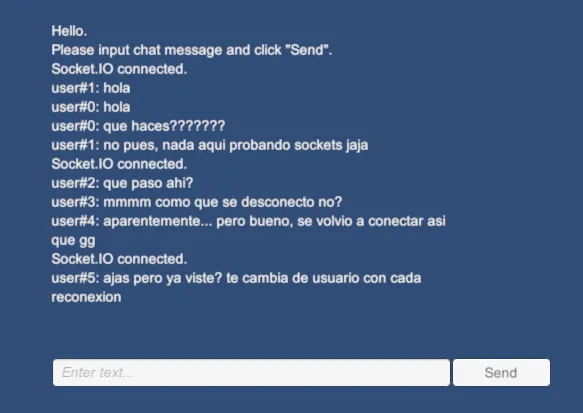
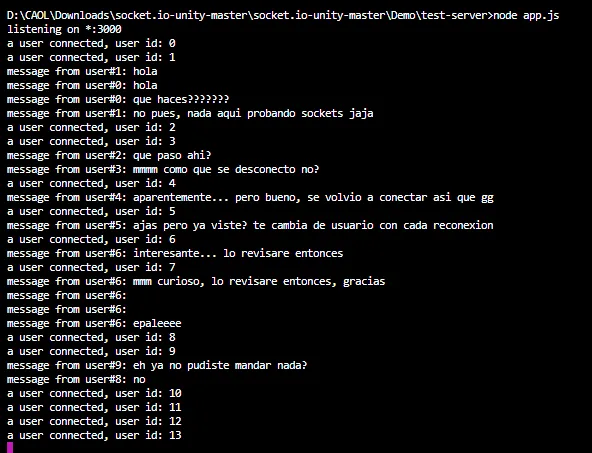
https://github.com/Rocher0724/socket.io-unity/issues/15
// Fixed

//SOLUCION AUMENTAR EL PING INTERVAL DEL SERVER.JS A 60000 Y DESHABILITAR EL EnableAutoSendPing EN WEBSOCKET.CS
//server js
this.pingTimeout = opts.pingTimeout || 60000;

//websocket.cs
this.ws.EnableAutoSendPing = false;
Requirió investigación sobre:
- http://Socket.io
- Node.js
//Links
//Original plugin C#
https://github.com/doghappy/socket.io-client-csharp
//mono .net implamentations
https://github.com/floatinghotpot/socket.io-unity
https://github.com/floatinghotpot/socket.io-unity
https://github.com/itisnajim/SocketIOUnity
//asset store plugin
Socket.IO V4 Client PLUS (Standalone & WebGL) | Network | Unity Asset Store